---
title: Configuring your GitHub Actions builder
linkTitle: BuildKit configuration
description: Configuring BuildKit instances for building in CI with GitHub Actions
keywords: ci, github actions, gha, buildkit, buildx
---

This page contains instructions on configuring your BuildKit instances when
using our [Setup Buildx Action](https://github.com/docker/setup-buildx-action).

## Version pinning

By default, the action will attempt to use the latest version of [Buildx](https://github.com/docker/buildx)
available on the GitHub Runner (the build client) and the latest release of
[BuildKit](https://github.com/moby/buildkit) (the build server).

To pin to a specific version of Buildx, use the `version` input. For example,
to pin to Buildx v0.10.0:

```yaml
- name: Set up Docker Buildx
  uses: docker/setup-buildx-action@v3
  with:
    version: v0.10.0
```

To pin to a specific version of BuildKit, use the `image` option in the
`driver-opts` input. For example, to pin to BuildKit v0.11.0:

```yaml
- name: Set up Docker Buildx
  uses: docker/setup-buildx-action@v3
  with:
    driver-opts: image=moby/buildkit:v0.11.0
```

## BuildKit container logs

To display BuildKit container logs when using the `docker-container` driver,
you must either [enable step debug logging](https://docs.github.com/en/actions/monitoring-and-troubleshooting-workflows/enabling-debug-logging#enabling-step-debug-logging),
or set the `--debug` buildkitd flag in the [Docker Setup Buildx](https://github.com/marketplace/actions/docker-setup-buildx) action:

```yaml
name: ci

on:
  push:

jobs:
  buildx:
    runs-on: ubuntu-latest
    steps:
      - name: Set up Docker Buildx
        uses: docker/setup-buildx-action@v3
        with:
          buildkitd-flags: --debug

      - name: Build
        uses: docker/build-push-action@v6
```

Logs will be available at the end of a job:
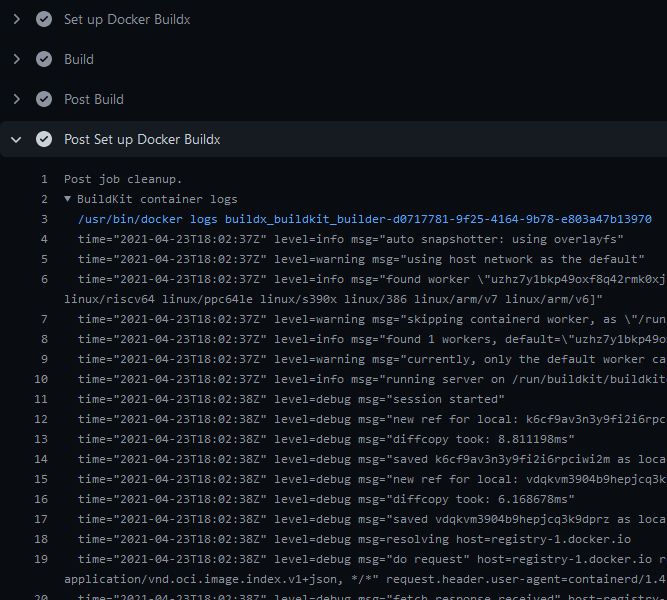
## BuildKit Daemon configuration

You can provide a [BuildKit configuration](../../buildkit/toml-configuration.md)
to your builder if you're using the [`docker-container` driver](/manuals/build/builders/drivers/docker-container.md)
(default) with the `config` or `buildkitd-config-inline` inputs:

### Registry mirror

You can configure a registry mirror using an inline block directly in your
workflow with the `buildkitd-config-inline` input:

```yaml
name: ci

on:
  push:

jobs:
  buildx:
    runs-on: ubuntu-latest
    steps:
      - name: Set up Docker Buildx
        uses: docker/setup-buildx-action@v3
        with:
          buildkitd-config-inline: |
            [registry."docker.io"]
              mirrors = ["mirror.gcr.io"]
```

For more information about using a registry mirror, see [Registry mirror](../../buildkit/configure.md#registry-mirror).

### Max parallelism

You can limit the parallelism of the BuildKit solver which is particularly
useful for low-powered machines.

You can use the `buildkitd-config-inline` input like the previous example, or you can use
a dedicated BuildKit config file from your repository if you want with the
`config` input:

```toml
# .github/buildkitd.toml
[worker.oci]
  max-parallelism = 4
```

```yaml
name: ci

on:
  push:

jobs:
  buildx:
    runs-on: ubuntu-latest
    steps:
      - name: Set up Docker Buildx
        uses: docker/setup-buildx-action@v3
        with:
          config: .github/buildkitd.toml
```

## Append additional nodes to the builder

Buildx supports running builds on multiple machines. This is useful for building
[multi-platform images](../../building/multi-platform.md) on native nodes for
more complicated cases that aren't handled by QEMU. Building on native nodes
generally has better performance, and allows you to distribute the build across
multiple machines.

You can append nodes to the builder you're creating using the `append` option.
It takes input in the form of a YAML string document to remove limitations
intrinsically linked to GitHub Actions: you can only use strings in the input
fields:

| Name              | Type   | Description                                                                                                                                                                                                                                                             |
| ----------------- | ------ | ----------------------------------------------------------------------------------------------------------------------------------------------------------------------------------------------------------------------------------------------------------------------- |
| `name`            | String | [Name of the node](/reference/cli/docker/buildx/create.md#node). If empty, it's the name of the builder it belongs to, with an index number suffix. This is useful to set it if you want to modify/remove a node in an underlying step of you workflow. |
| `endpoint`        | String | [Docker context or endpoint](/reference/cli/docker/buildx/create.md#description) of the node to add to the builder                                                                                                                                      |
| `driver-opts`     | List   | List of additional [driver-specific options](/reference/cli/docker/buildx/create.md#driver-opt)                                                                                                                                                         |
| `buildkitd-flags` | String | [Flags for buildkitd](/reference/cli/docker/buildx/create.md#buildkitd-flags) daemon                                                                                                                                                                    |
| `platforms`       | String | Fixed [platforms](/reference/cli/docker/buildx/create.md#platform) for the node. If not empty, values take priority over the detected ones.                                                                                                             |

Here is an example using remote nodes with the [`remote` driver](/manuals/build/builders/drivers/remote.md)
and [TLS authentication](#tls-authentication):

```yaml
name: ci

on:
  push:

jobs:
  buildx:
    runs-on: ubuntu-latest
    steps:
      - name: Set up Docker Buildx
        uses: docker/setup-buildx-action@v3
        with:
          driver: remote
          endpoint: tcp://oneprovider:1234
          append: |
            - endpoint: tcp://graviton2:1234
              platforms: linux/arm64
            - endpoint: tcp://linuxone:1234
              platforms: linux/s390x
        env:
          BUILDER_NODE_0_AUTH_TLS_CACERT: ${{ secrets.ONEPROVIDER_CA }}
          BUILDER_NODE_0_AUTH_TLS_CERT: ${{ secrets.ONEPROVIDER_CERT }}
          BUILDER_NODE_0_AUTH_TLS_KEY: ${{ secrets.ONEPROVIDER_KEY }}
          BUILDER_NODE_1_AUTH_TLS_CACERT: ${{ secrets.GRAVITON2_CA }}
          BUILDER_NODE_1_AUTH_TLS_CERT: ${{ secrets.GRAVITON2_CERT }}
          BUILDER_NODE_1_AUTH_TLS_KEY: ${{ secrets.GRAVITON2_KEY }}
          BUILDER_NODE_2_AUTH_TLS_CACERT: ${{ secrets.LINUXONE_CA }}
          BUILDER_NODE_2_AUTH_TLS_CERT: ${{ secrets.LINUXONE_CERT }}
          BUILDER_NODE_2_AUTH_TLS_KEY: ${{ secrets.LINUXONE_KEY }}
```

## Authentication for remote builders

The following examples show how to handle authentication for remote builders,
using SSH or TLS.

### SSH authentication

To be able to connect to an SSH endpoint using the [`docker-container` driver](/manuals/build/builders/drivers/docker-container.md),
you have to set up the SSH private key and configuration on the GitHub Runner:

```yaml
name: ci

on:
  push:

jobs:
  buildx:
    runs-on: ubuntu-latest
    steps:
      - name: Set up SSH
        uses: MrSquaare/ssh-setup-action@2d028b70b5e397cf8314c6eaea229a6c3e34977a # v3.1.0
        with:
          host: graviton2
          private-key: ${{ secrets.SSH_PRIVATE_KEY }}
          private-key-name: aws_graviton2

      - name: Set up Docker Buildx
        uses: docker/setup-buildx-action@v3
        with:
          endpoint: ssh://me@graviton2
```

### TLS authentication

You can also [set up a remote BuildKit instance](/manuals/build/builders/drivers/remote.md#example-remote-buildkit-in-docker-container)
using the remote driver. To ease the integration in your workflow, you can use
an environment variables that sets up authentication using the BuildKit client
certificates for the `tcp://`:

- `BUILDER_NODE_<idx>_AUTH_TLS_CACERT`
- `BUILDER_NODE_<idx>_AUTH_TLS_CERT`
- `BUILDER_NODE_<idx>_AUTH_TLS_KEY`

The `<idx>` placeholder is the position of the node in the list of nodes.

```yaml
name: ci

on:
  push:

jobs:
  buildx:
    runs-on: ubuntu-latest
    steps:
      - name: Set up Docker Buildx
        uses: docker/setup-buildx-action@v3
        with:
          driver: remote
          endpoint: tcp://graviton2:1234
        env:
          BUILDER_NODE_0_AUTH_TLS_CACERT: ${{ secrets.GRAVITON2_CA }}
          BUILDER_NODE_0_AUTH_TLS_CERT: ${{ secrets.GRAVITON2_CERT }}
          BUILDER_NODE_0_AUTH_TLS_KEY: ${{ secrets.GRAVITON2_KEY }}
```

## Standalone mode

If you don't have the Docker CLI installed on the GitHub Runner, the Buildx
binary gets invoked directly, instead of calling it as a Docker CLI plugin. This
can be useful if you want to use the `kubernetes` driver in your self-hosted
runner:

```yaml
name: ci

on:
  push:

jobs:
  buildx:
    runs-on: ubuntu-latest
    steps:
      - name: Checkout
        uses: actions/checkout@v4

      - name: Set up Docker Buildx
        uses: docker/setup-buildx-action@v3
        with:
          driver: kubernetes

      - name: Build
        run: |
          buildx build .
```

## Isolated builders

The following example shows how you can select different builders for different
jobs.

An example scenario where this might be useful is when you are using a monorepo,
and you want to pinpoint different packages to specific builders. For example,
some packages may be particularly resource-intensive to build and require more
compute. Or they require a builder equipped with a particular capability or
hardware.

For more information about remote builder, see [`remote` driver](/manuals/build/builders/drivers/remote.md)
and the [append builder nodes example](#append-additional-nodes-to-the-builder).

```yaml
name: ci

on:
  push:

jobs:
  docker:
    runs-on: ubuntu-latest
    steps:
      - name: Set up builder1
        uses: docker/setup-buildx-action@v3
        id: builder1

      - name: Set up builder2
        uses: docker/setup-buildx-action@v3
        id: builder2

      - name: Build against builder1
        uses: docker/build-push-action@v6
        with:
          builder: ${{ steps.builder1.outputs.name }}
          target: mytarget1

      - name: Build against builder2
        uses: docker/build-push-action@v6
        with:
          builder: ${{ steps.builder2.outputs.name }}
          target: mytarget2
```