---
title: Configuring your GitHub Actions builder
linkTitle: BuildKit configuration
description: Configuring BuildKit instances for building in CI with GitHub Actions
keywords: ci, github actions, gha, buildkit, buildx
---

This page contains instructions on configuring your BuildKit instances when
using our [Setup Buildx Action](https://github.com/docker/setup-buildx-action).

## Version pinning

By default, the action will attempt to use the latest version of [Buildx](https://github.com/docker/buildx)
available on the GitHub Runner (the build client) and the latest release of
[BuildKit](https://github.com/moby/buildkit) (the build server).

To pin to a specific version of Buildx, use the `version` input. For example,
to pin to Buildx v0.10.0:

```yaml
- name: Set up Docker Buildx
  uses: docker/setup-buildx-action@v3
  with:
    version: v0.10.0
```

To pin to a specific version of BuildKit, use the `image` option in the
`driver-opts` input. For example, to pin to BuildKit v0.11.0:

```yaml
- name: Set up Docker Buildx
  uses: docker/setup-buildx-action@v3
  with:
    driver-opts: image=moby/buildkit:v0.11.0
```

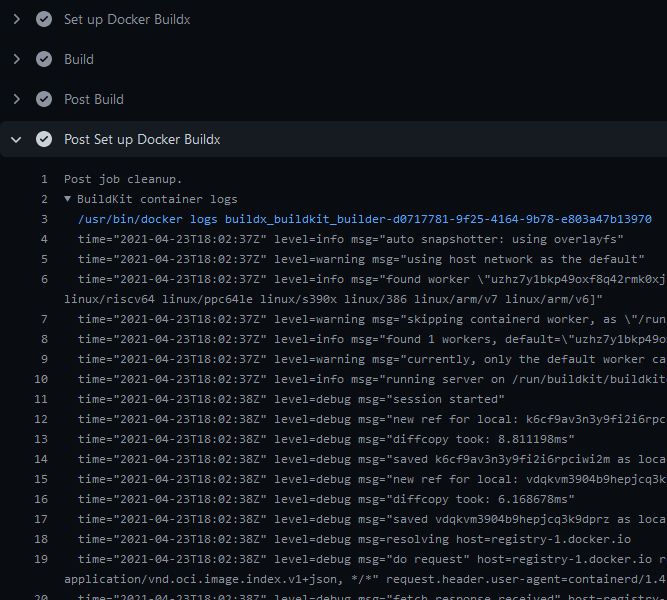
## BuildKit container logs

To display BuildKit container logs when using the `docker-container` driver,
you must either [enable step debug logging](https://docs.github.com/en/actions/monitoring-and-troubleshooting-workflows/enabling-debug-logging#enabling-step-debug-logging),
or set the `--debug` buildkitd flag in the [Docker Setup Buildx](https://github.com/marketplace/actions/docker-setup-buildx) action:

```yaml
name: ci

on:
  push:

jobs:
  buildx:
    runs-on: ubuntu-latest
    steps:
      - name: Set up Docker Buildx
        uses: docker/setup-buildx-action@v3
        with:
          buildkitd-flags: --debug

      - name: Build
        uses: docker/build-push-action@v6
```

Logs will be available at the end of a job:
## BuildKit Daemon configuration

You can provide a [BuildKit configuration](../../buildkit/toml-configuration.md)
to your builder if you're using the [`docker-container` driver](/manuals/build/builders/drivers/docker-container.md)