---
title: GitHub Actions build summary
linkTitle: Build summary
description: Get an overview of your Docker Builds with GitHub Actions
keywords: github actions, gha, build, summary, annotation
---

Docker's GitHub Actions for building and pushing images generate a job summary
for your build that outlines the execution and materials used:

- A summary showing the Dockerfile used, the build duration, and cache utilization
- Inputs for the build, such as build arguments, tags, labels, and build contexts
- For builds with [Bake](../../bake/_index.md), the full bake definition for the build
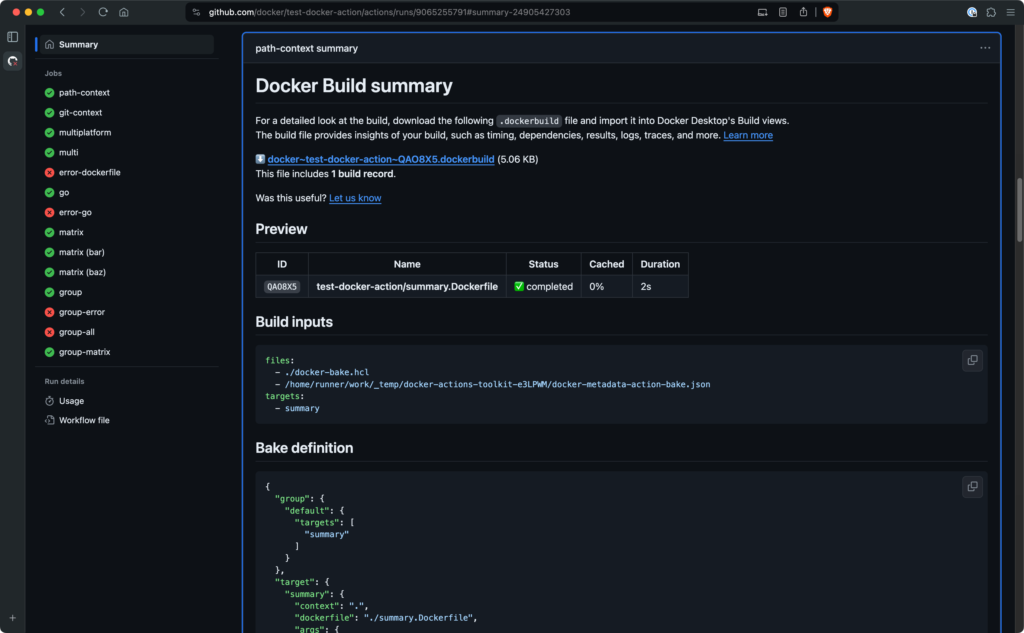
Job summaries for Docker builds appear automatically if you use the following
versions of the [Build and push Docker images](https://github.com/marketplace/actions/build-and-push-docker-images)
or [Docker Buildx Bake](https://github.com/marketplace/actions/docker-buildx-bake)
GitHub Actions:

- `docker/build-push-action@v6`
- `docker/bake-action@v6`

To view the job summary, open the details page for the job in GitHub after the
job has finished. The summary is available for both failed and successful
builds. In the case of a failed build, the summary also displays the error
message that caused the build to fail:

## Import build records to Docker Desktop

{{< summary-bar feature_name="Import builds" >}}

The job summary includes a link for downloading a build record archive for the
run. The build record archive is a ZIP file containing the details about a build
(or builds, if you use `docker/bake-action` to build multiple targets). You can
import this build record archive into Docker Desktop, which gives you a
powerful, graphical interface for further analyzing the build's performance via
the [Docker Desktop **Builds** view](/manuals/desktop/use-desktop/builds.md).

To import the build record archive into Docker Desktop:

1. Download and install [Docker Desktop](/get-started/get-docker.md).

2. Download the build record archive from the job summary in GitHub Actions.

3. Open the **Builds** view in Docker Desktop.

4. Select the **Import build** button, and then browse for the `.zip` archive
   job summary that you downloaded. Alternatively, you can drag-and-drop the
   build record archive ZIP file onto the Docker Desktop window after opening
   the import build dialog.

5. Select **Import** to add the build records.

After a few seconds, the builds from the GitHub Actions run appear under the
**Completed builds** tab in the Builds view. To inspect a build and see a
detailed view of all the inputs, results, build steps, and cache utilization,
select the item in the list.

## Disable job summary

To disable job summaries, set the `DOCKER_BUILD_SUMMARY` environment variable
in the YAML configuration for your build step:

```yaml {hl_lines=4}
      - name: Build
        uses: docker/build-push-action@v6
        env:
          DOCKER_BUILD_SUMMARY: false
        with:
          tags: ${{ steps.meta.outputs.tags }}
          labels: ${{ steps.meta.outputs.labels }}
```

## Disable build record upload

To disable the upload of the build record archive to GitHub, set the
`DOCKER_BUILD_RECORD_UPLOAD` environment variable in the YAML configuration for
your build step:

```yaml {hl_lines=4}
      - name: Build
        uses: docker/build-push-action@v6
        env:
          DOCKER_BUILD_RECORD_UPLOAD: false
        with:
          tags: ${{ steps.meta.outputs.tags }}
          labels: ${{ steps.meta.outputs.labels }}
```

With this configuration, the build summary is still generated, but does not
contain a link to download the build record archive.

## Limitations

Build summaries are currently not supported for:

- Builds using [Docker Build Cloud](/manuals/build-cloud/_index.md). Support for Docker
  Build Cloud is planned for a future release.
- Repositories hosted on GitHub Enterprise Servers. Summaries can only be
  viewed for repositories hosted on GitHub.com.