3rd chunk of `content/manuals/security/for-admins/provisioning/just-in-time.md`
bac58f958b9c1dcc011871684017ce5fa3f4966734c1dfb700000001000004b8
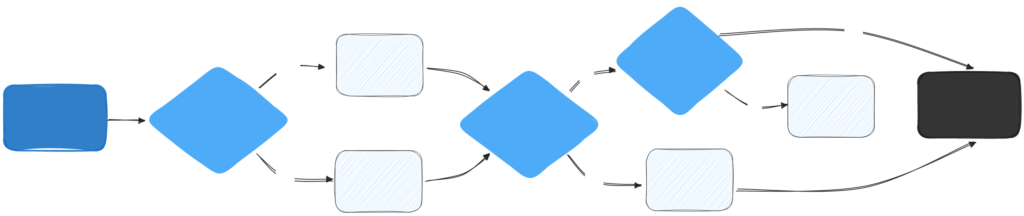
    - If an account exists: The system uses the existing account and updates the user's full name if necessary.
    - If no account exists: A new Docker account is created using basic user attributes (email, name, and surname). A unique username is generated based on the user's email, name, and random numbers to ensure all usernames are unique across the platform.

2. The system checks for any pending invitations to the SSO organization.

   - Invitation found: If the user is a member of the organization or has a pending invitation, sign-in is successful, and the invitation is automatically accepted.
   - No invitation found: If the user is not a member of the organization and has no pending invitation, the sign-in fails, and an `Access denied` error appears. The user must contact an administrator to be invited to the organization.

With JIT disabled, group mapping is only available if you have [SCIM enabled](/security/for-admins/provisioning/scim/#enable-scim-in-docker). If SCIM is not enabled, users won't be auto-provisioned to groups.

The following graphic provides an overview of SSO authentication with JIT disabled: