4th chunk of `content/manuals/docker-hub/repos/manage/vulnerability-scanning.md`
b364dcb36a495533f81e989d42128e5909845d522584ffcb00000001000007ab
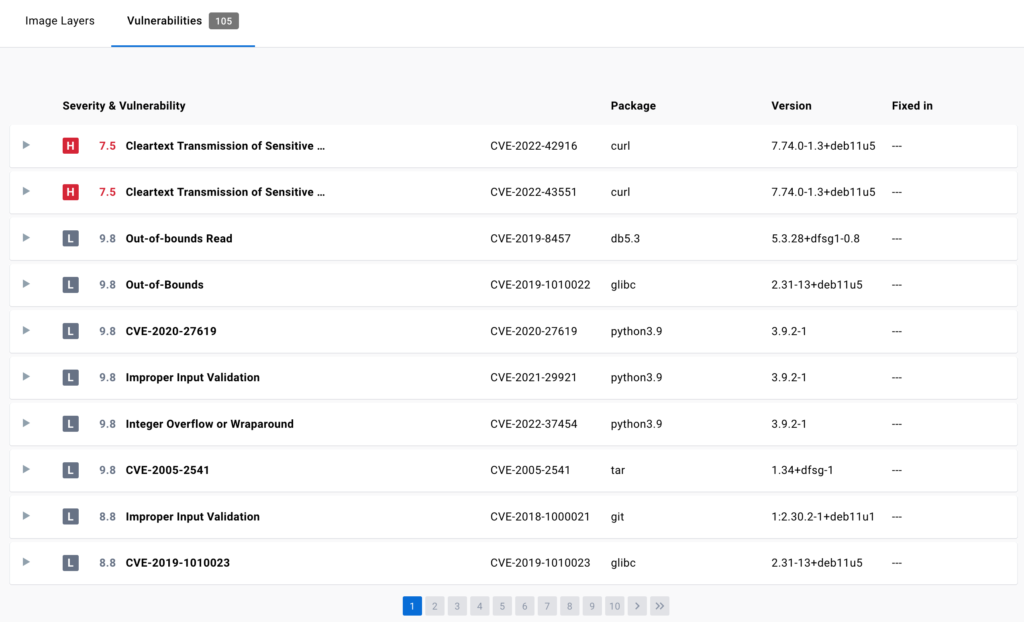
For more information on this view, see
[Image details view](/manuals/scout/explore/image-details-view.md).

### Inspect vulnerabilities

The vulnerability report sorts vulnerabilities based on their severity. It
displays information about the package that contains the vulnerability, the
version in which it was introduced, and whether the vulnerability has been fixed
in a later version.

The vulnerability scan report also allows development teams and security leads
to compare the vulnerability counts across tags to see whether the
vulnerabilities are decreasing or increasing over time.

### Fix vulnerabilities

Once a list of vulnerabilities have been identified, there are a couple of
actions you can take to remediate the vulnerabilities. For example, you can:

1. Specify an updated base image in the Dockerfile, check your application-level
   dependencies, rebuild the Docker image, and then push the new image to Docker
   Hub.
2. Rebuild the Docker image, run an update command on the OS packages, and push
   a newer version of image to Docker Hub.
3. Edit the Dockerfile to manually remove or update specific libraries that
   contain vulnerabilities, rebuild the image, and push the new image to Docker
   Hub

Docker Scout can provide you with concrete and contextual remediation steps for
improving image security. For more information, see
[Docker Scout](/manuals/scout/_index.md).

### Turn off static vulnerability scanning

Repository owners and administrators can disable static vulnerability scanning
on a repository. To disable scanning:

1. Sign in to [Docker Hub](https://hub.docker.com).
2. Select **My Hub** > **Repositories**.

   A list of your repositories appears.

3. Select a repository.

   The **General** page for the repository appears.

4. Select the **Settings** tab.
5. Under **Image security insight settings**, select **None**.
6. Select **Save**.