There is no action required on your part. Scans continue to run as usual
with no interruption or changes to pricing. Historical data continues to be
available.

### Turn on static vulnerability scanning

Repository owners and administrators can enable static vulnerability scanning
on a repository. If you are a member of a Team or a Business subscription,
ensure the repository you would like to enable scanning on is part of the Team
or a Business tier.

When scanning is active on a repository, anyone with push access can trigger a
scan by pushing an image to Docker Hub.

To enable static vulnerability scanning:

> [!NOTE]
>
> Static vulnerability scanning supports scanning images which are of AMD64
> architecture, Linux OS, and are less than 10 GB in size.

1. Sign in to [Docker Hub](https://hub.docker.com).
2. Select **My Hub** > **Repositories**.

   A list of your repositories appears.

3. Select a repository.

   The **General** page for the repository appears.

4. Select the **Settings** tab.
5. Under **Image security insight settings**, select **Static scanning**.
6. Select **Save**.

### Scan an image

To scan an image for vulnerabilities, push the image to Docker Hub, to the
repository for which you have turned on scanning.

### View the vulnerability report

To view the vulnerability report:

1. Sign in to [Docker Hub](https://hub.docker.com).
2. Select **My Hub** > **Repositories**.

   A list of your repositories appears.

3. Select a repository.

   The **General** page for the repository appears.
   It may take a couple of minutes for the vulnerability report to appear in
   your repository.
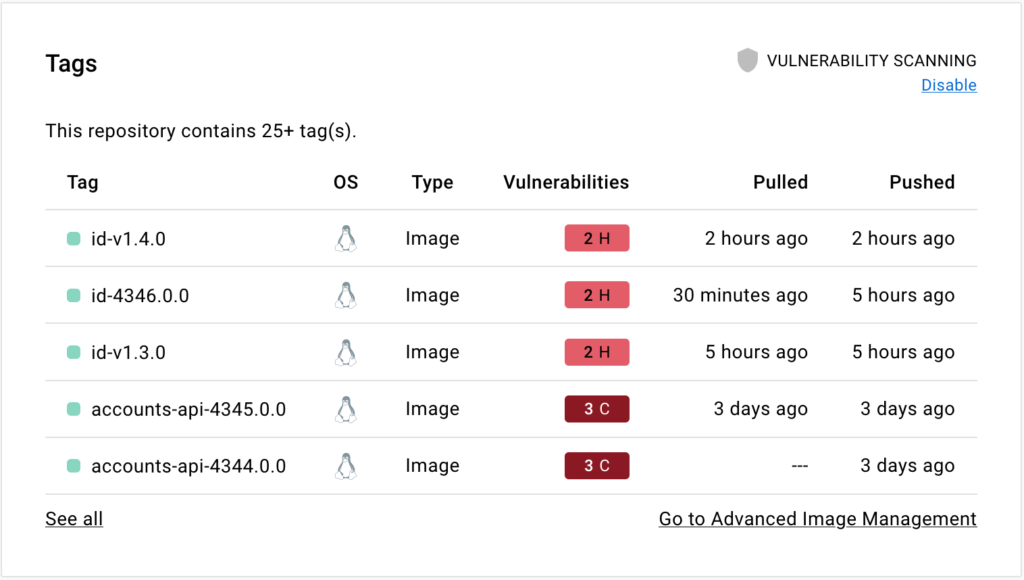
4. Select the **Tags** tab, then **Digest**, then **Vulnerabilities** to view the
   detailed scan report.

   The scan report displays vulnerabilities identified by the scan, sorting them
   according to their severity, with highest severity listed at the top. It
   displays information about the package that contains the vulnerability, the
   version in which it was introduced, and whether the vulnerability is fixed in