$ ls  /var/lib/docker/overlay2/3a36935c9df35472229c57f4a27105a136f5e4dbef0f87905b2e506e494e348b/diff

bin  boot  dev  etc  home  lib  lib64  media  mnt  opt  proc  root  run  sbin  srv  sys  tmp  usr  var
```

The second-lowest layer, and each higher layer, contain a file called `lower`,
which denotes its parent, and a directory called `diff` which contains its
contents. It also contains a `merged` directory, which contains the unified
contents of its parent layer and itself, and a `work` directory which is used
internally by OverlayFS.

```console
$ ls /var/lib/docker/overlay2/223c2864175491657d238e2664251df13b63adb8d050924fd1bfcdb278b866f7

diff  link  lower  merged  work

$ cat /var/lib/docker/overlay2/223c2864175491657d238e2664251df13b63adb8d050924fd1bfcdb278b866f7/lower

l/6Y5IM2XC7TSNIJZZFLJCS6I4I4

$ ls /var/lib/docker/overlay2/223c2864175491657d238e2664251df13b63adb8d050924fd1bfcdb278b866f7/diff/

etc  sbin  usr  var
```

To view the mounts which exist when you use the `overlay` storage driver with
Docker, use the `mount` command. The output below is truncated for readability.

```console
$ mount | grep overlay

overlay on /var/lib/docker/overlay2/9186877cdf386d0a3b016149cf30c208f326dca307529e646afce5b3f83f5304/merged
type overlay (rw,relatime,
lowerdir=l/DJA75GUWHWG7EWICFYX54FIOVT:l/B3WWEFKBG3PLLV737KZFIASSW7:l/JEYMODZYFCZFYSDABYXD5MF6YO:l/UL2MW33MSE3Q5VYIKBRN4ZAGQP:l/NFYKDW6APBCCUCTOUSYDH4DXAT:l/6Y5IM2XC7TSNIJZZFLJCS6I4I4,
upperdir=9186877cdf386d0a3b016149cf30c208f326dca307529e646afce5b3f83f5304/diff,
workdir=9186877cdf386d0a3b016149cf30c208f326dca307529e646afce5b3f83f5304/work)
```

The `rw` on the second line shows that the `overlay` mount is read-write.

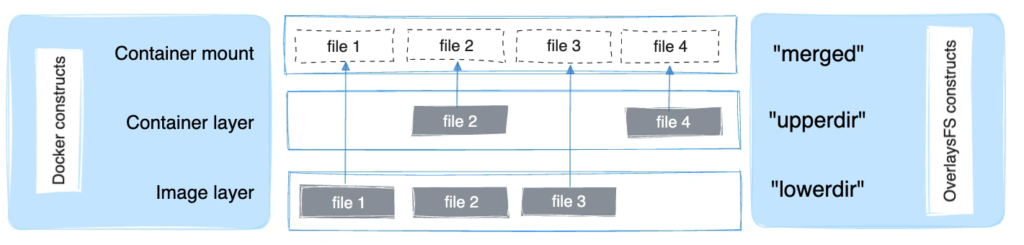
The following diagram shows how a Docker image and a Docker container are
layered. The image layer is the `lowerdir` and the container layer is the
`upperdir`. If the image has multiple layers, multiple `lowerdir` directories
are used. The unified view is exposed through a directory called `merged` which
is effectively the containers mount point.