---
title: Authentication
description: Docker extension OAuth 2.0 flow
keywords: Docker, extensions, sdk, OAuth 2.0
aliases:
 - /desktop/extensions-sdk/dev/oauth2-flow/
 - /desktop/extensions-sdk/guides/oauth2-flow/
---

> [!NOTE]
>
> This page assumes that you already have an Identity Provider (IdP), such as Google, Entra ID (formerly Azure AD) or Okta, which handles the authentication process and returns an access token.

Learn how you can let users authenticate from your extension using OAuth 2.0 via a web browser, and return to your extension.

In OAuth 2.0, the term "grant type" refers to the way an application gets an access token. Although OAuth 2.0 defines several grant types, this page only describes how to authorize users from your extension using the Authorization Code grant type.

## Authorization code grant flow

The Authorization Code grant type is used by confidential and public clients to exchange an authorization code for an access token.

After the user returns to the client via the redirect URL, the application gets the authorization code from the URL and uses it to request an access token.
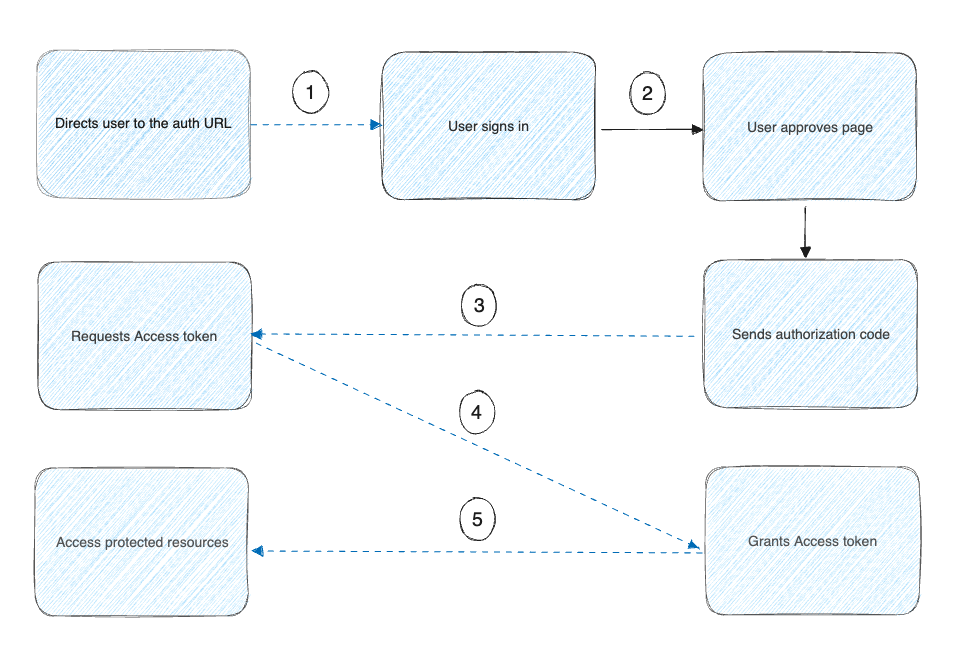
The image above shows that:

- The Docker extension asks the user to authorize access to their data.
- If the user grants access, the extension then requests an access token from the service provider, passing the access grant from the user and authentication details to identify the client.