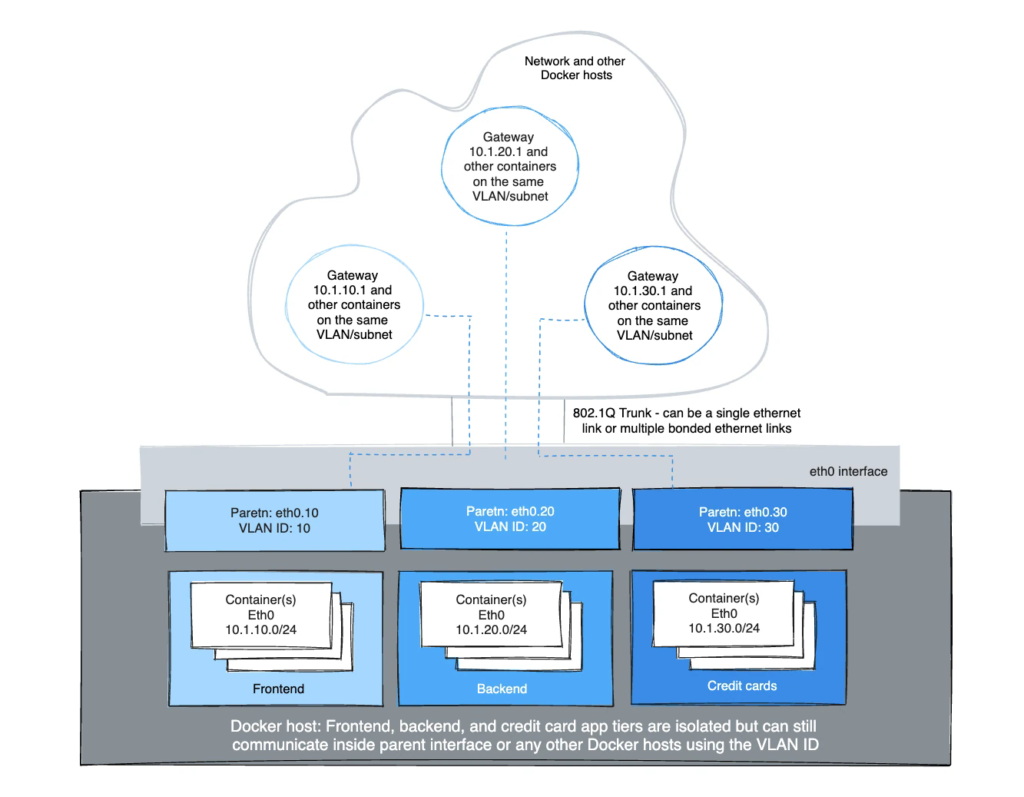
The Linux sub-interface tagged with a VLAN can either already exist or will be
created when you call a `docker network create`. `docker network rm` will delete
the sub-interface. Parent interfaces such as `eth0` are not deleted, only
sub-interfaces with a netlink parent index > 0.

For the driver to add/delete the VLAN sub-interfaces the format needs to be
`interface_name.vlan_tag`. Other sub-interface naming can be used as the
specified parent, but the link will not be deleted automatically when
`docker network rm` is invoked.

The option to use either existing parent VLAN sub-interfaces or let Docker manage
them enables the user to either completely manage the Linux interfaces and
networking or let Docker create and delete the VLAN parent sub-interfaces
(netlink `ip link`) with no effort from the user.

For example: use `eth0.10` to denote a sub-interface of `eth0` tagged with the
VLAN id of `10`. The equivalent `ip link` command would be
`ip link add link eth0 name eth0.10 type vlan id 10`.

The example creates the VLAN tagged networks and then starts two containers to
test connectivity between containers. Different VLANs cannot ping one another
without a router routing between the two networks. The default namespace is not
reachable per IPvlan design in order to isolate container namespaces from the
underlying host.

#### VLAN ID 20

In the first network tagged and isolated by the Docker host, `eth0.20` is the
parent interface tagged with VLAN id `20` specified with `-o parent=eth0.20`.
Other naming formats can be used, but the links need to be added and deleted
manually using `ip link` or Linux configuration files. As long as the `-o parent`
exists, anything can be used if it is compliant with Linux netlink.

```console
# now add networks and hosts as you would normally by attaching to the master (sub)interface that is tagged
$ docker network create -d ipvlan \
    --subnet=192.168.20.0/24 \
    --gateway=192.168.20.1 \
    -o parent=eth0.20 ipvlan20

# in two separate terminals, start a Docker container and the containers can now ping one another.