---
description: Learn how single sign-on works, how to set it up, and the required SSO attributes.
keywords: Single Sign-On, SSO, sign-on, admin, docker hub, admin console, security
title: Single sign-on overview
linkTitle: Single sign-on
aliases:
- /single-sign-on/
- /admin/company/settings/sso/
- /admin/organization/security-settings/sso-management/
weight: 10
---

{{< summary-bar feature_name="SSO" >}}

Single sign-on (SSO) lets users access Docker by authenticating using their identity providers (IdPs). SSO is available for a whole company, and all associated organizations within that company, or an individual organization that has a Docker Business subscription. To upgrade your existing account to a Docker Business subscription, see [Upgrade your subscription](/subscription/upgrade/).

## How SSO works

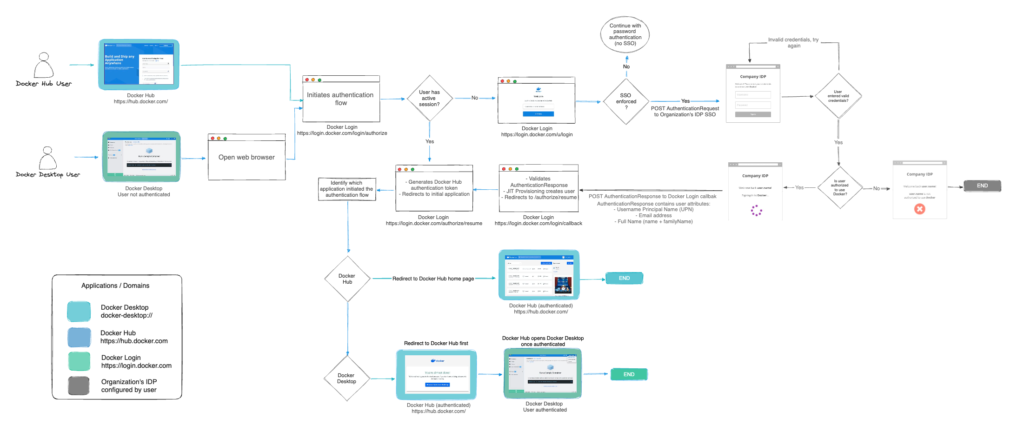
When you enable SSO, Docker supports a non-IdP-initiated SSO flow for user login. Instead of users authenticating using their Docker username and password, they are redirected to your identity provider's authentication page to sign in. Users must sign in to Docker Hub or Docker Desktop to initiate the SSO authentication process.

The following diagram shows how SSO operates and is managed in Docker Hub and Docker Desktop. In addition, it provides information on how to authenticate between your IdP.