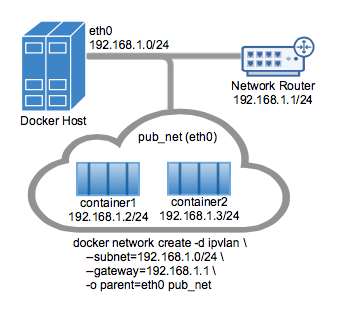
The parent interface in the next example `-o parent=eth0` is configured as follows:
```console
$ ip addr show eth0
3: eth0: <BROADCAST,MULTICAST,UP,LOWER_UP> mtu 1500 qdisc pfifo_fast state UP group default qlen 1000
inet 192.168.1.250/24 brd 192.168.1.255 scope global eth0
```
Use the network from the host's interface as the `--subnet` in the
`docker network create`. The container will be attached to the same network as
the host interface as set via the `-o parent=` option.
Create the IPvlan network and run a container attaching to it:
```console
# IPvlan (-o ipvlan_mode= Defaults to L2 mode if not specified)
$ docker network create -d ipvlan \
--subnet=192.168.1.0/24 \
--gateway=192.168.1.1 \
-o ipvlan_mode=l2 \
-o parent=eth0 db_net
# Start a container on the db_net network
$ docker run --net=db_net -it --rm alpine /bin/sh
# NOTE: the containers can NOT ping the underlying host interfaces as
# they are intentionally filtered by Linux for additional isolation.
```
The default mode for IPvlan is `l2`. If `-o ipvlan_mode=` is left unspecified,
the default mode will be used. Similarly, if the `--gateway` is left empty, the
first usable address on the network will be set as the gateway. For example, if
the subnet provided in the network create is `--subnet=192.168.1.0/24` then the
gateway the container receives is `192.168.1.1`.
To help understand how this mode interacts with other hosts, the following
figure shows the same layer 2 segment between two Docker hosts that applies to
and IPvlan L2 mode.

The following will create the exact same network as the network `db_net` created
earlier, with the driver defaults for `--gateway=192.168.1.1` and `-o ipvlan_mode=l2`.
```console
# IPvlan (-o ipvlan_mode= Defaults to L2 mode if not specified)
$ docker network create -d ipvlan \
--subnet=192.168.1.0/24 \