| `com.docker.extension.categories`           | No       | The list of Marketplace categories that your extension belongs to: `ci-cd`, `container-orchestration`, `cloud-deployment`, `cloud-development`, `database`, `kubernetes`, `networking`, `image-registry`, `security`, `testing-tools`, `utility-tools`,`volumes`. If you don't specify this label, users won't be able to find your extension in the Extensions Marketplace when filtering by a category. Extensions published to the Marketplace before the 22nd of September 2022 have been auto-categorized by Docker. | Specified as comma separated values in case of having multiple categories e.g: `kubernetes,security` or a single value e.g. `kubernetes`.                                                                                                   |

> [!TIP]
>
> Docker Desktop applies CSS styles to the provided HTML content. You can make sure that it renders correctly
> [within the Marketplace](#preview-the-extension-in-the-marketplace). It is recommended that you follow the
> [styling guidelines](../design/_index.md).

## Preview the extension in the Marketplace

You can validate that the image labels render as you expect.

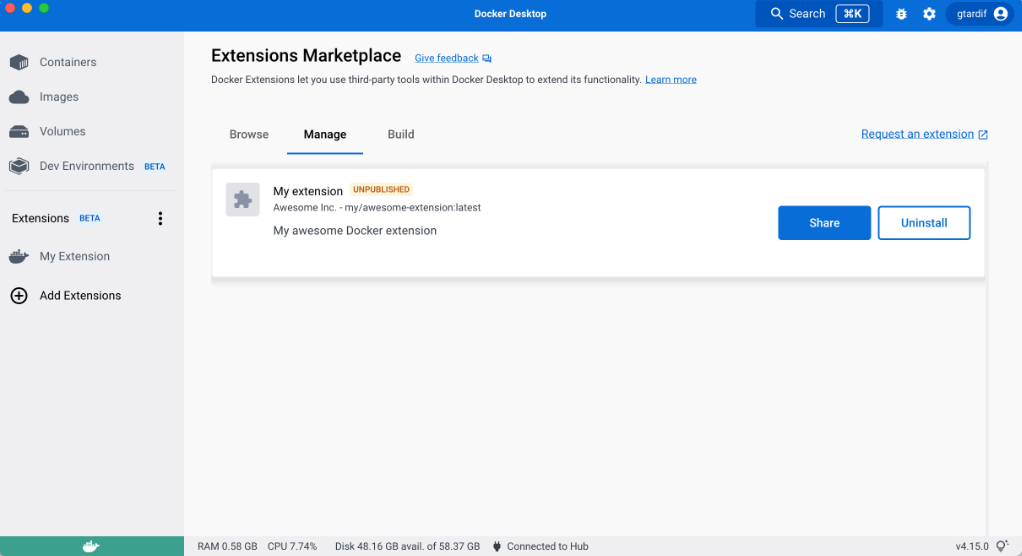
When you create and install your unpublished extension, you can preview the extension in the Marketplace's **Managed** tab. You can see how the extension labels render in the list and in the details page of the extension.

> Preview extensions already listed in Marketplace
>
> When you install a local image of an extension already published in the Marketplace, for example with the tag `latest`, your local image is not detected as "unpublished".
>
> You can re-tag your image in order to have a different image name that's not listed as a published extension.
> Use `docker tag org/published-extension unpublished-extension` and then `docker extension install unpublished-extension`.