---
title: IPvlan network driver
description: All about using IPvlan to make your containers appear like physical machines
  on the network
keywords: network, ipvlan, l2, l3, standalone
aliases:
- /network/ipvlan/
- /network/drivers/ipvlan/
---

The IPvlan driver gives users total control over both IPv4 and IPv6 addressing.
The VLAN driver builds on top of that in giving operators complete control of
layer 2 VLAN tagging and even IPvlan L3 routing for users interested in underlay
network integration. For overlay deployments that abstract away physical constraints
see the [multi-host overlay](/manuals/engine/network/tutorials/overlay.md) driver.

IPvlan is a new twist on the tried and true network virtualization technique.
The Linux implementations are extremely lightweight because rather than using
the traditional Linux bridge for isolation, they are associated to a Linux
Ethernet interface or sub-interface to enforce separation between networks and
connectivity to the physical network.

IPvlan offers a number of unique features and plenty of room for further
innovations with the various modes. Two high level advantages of these approaches
are, the positive performance implications of bypassing the Linux bridge and the
simplicity of having fewer moving parts. Removing the bridge that traditionally
resides in between the Docker host NIC and container interface leaves a simple
setup consisting of container interfaces, attached directly to the Docker host
interface. This result is easy to access for external facing services as there
is no need for port mappings in these scenarios.

## Options

The following table describes the driver-specific options that you can pass to
`--opt` when creating a network using the `ipvlan` driver.

| Option        | Default  | Description                                                           |
| ------------- | -------- | --------------------------------------------------------------------- |
| `ipvlan_mode` | `l2`     | Sets the IPvlan operating mode. Can be one of: `l2`, `l3`, `l3s`      |
| `ipvlan_flag` | `bridge` | Sets the IPvlan mode flag. Can be one of: `bridge`, `private`, `vepa` |
| `parent`      |          | Specifies the parent interface to use.                                |

## Examples

### Prerequisites

- The examples on this page are all single host.
- All examples can be performed on a single host running Docker. Any
  example using a sub-interface like `eth0.10` can be replaced with `eth0` or
  any other valid parent interface on the Docker host. Sub-interfaces with a `.`
  are created on the fly. `-o parent` interfaces can also be left out of the
  `docker network create` all together and the driver will create a `dummy`
  interface that will enable local host connectivity to perform the examples.
- Kernel requirements:
    - IPvlan Linux kernel v4.2+ (support for earlier kernels exists but is buggy). To check your current kernel version, use `uname -r`

### IPvlan L2 mode example usage

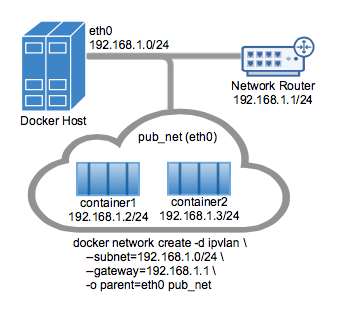
An example of the IPvlan `L2` mode topology is shown in the following image.
The driver is specified with `-d driver_name` option. In this case `-d ipvlan`.